| |||||||||
|









Cisco 7500 QoS Test Results
William A. (Andy) Adamson
andros@umich.edu
Test Bed
The three workstations are networked to three Cisco VIP2-50 100MB Fast Ethernet interfaces as shown below.
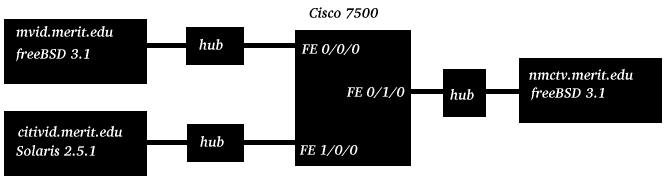
During the tests there was no other traffic on these interfaces or hubs. These machines are multi-homed so traceroute was used to ensure a direct path through the Cisco 7500 for each workstation pair.
Test Overview
The purpose of this testbed configuration is to understand configuration and behavior of the least measurable qbone unit, three interfaces on one router. For complete router configuration information, see the Configuration section at the end of this document.
Control
Send a stream of known bandwidth from FE 0/0/0 to FE 0/1/0. Record bandwidth and packet loss at the receiver. Send a stream of known bandwidth from FE 1/0/0 to FE 0/1/0. Record bandwidth and packet loss at the receiver. Send both streams at once, where the sum of the bandwidths is greater than the 100Mb supported by FE 0/1/0. Record bandwidth and packet loss at both receivers.
Police and drop
Configure a flow from FE 0/0/0 to FE 0/1/0. Send a stream from FE 0/0/0 to FE 0/1/03 whose known bandwidth ranges from just below to just above the configured flow. Record bandwidth and packet loss at the receiver.
Bandwidth reservation
Send a stream of known bandwidth from FE 0/0/0 to FE 0/1/0 and from FE 1/0/0 to FE 0/1/0 at the same time. The sum of the two bandwidths is greater than the 100Mb supported by FE 0/1/0. Configure a QoS flow to reserve bandwidth on one of the steams. Compare the results with the control.
Test Data
Control
Router#show interfaces random-detect
Router#
Router#show access-list
Router#
Router#show interfaces rate-limit
Router#
Here is the gen_send call and output, included this first call only
.citivid% gen_send 192.168.37.134 4202 40000 1000 560 100
0 bits sent seq_no: 0
msgend: 562 msg len: 562
40000000 bits sent seq_no: 8896
msgend: 564 msg len: 564
40000000 bits sent seq_no: 17762
40000000 bits sent seq_no: 26628
40000000 bits sent seq_no: 35494
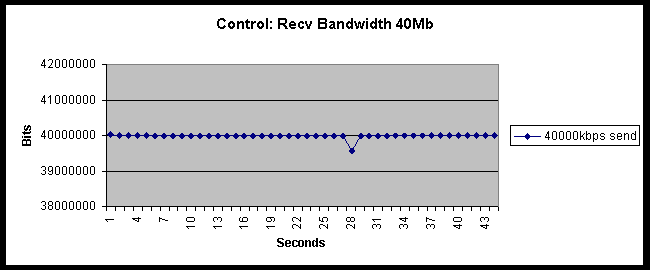
gen_send sent 40000000 bits each second by sending 8866 packets of size 564 bytes. 564*8*8865=39998880 , the last packet is sized less than 564 to make exactly 40000000 bits sent.
With 100 usec between sends, 1000000/100 = 10000 packets sent per second is possible, so data sends were spread over 88.66% of the second which is a fairly smooth transmission.
gen_recv showed no packet loss. The bandwidth data is graphed below.
- Send 70000kbps from mvid to nmctv.
mvid% gen_send 192.168.37.134 4250 70000 1000 880 100
msg_len: 884
sends per second: 9899
gen_recv showed no packet loss. The bandwidth data is graphed below.
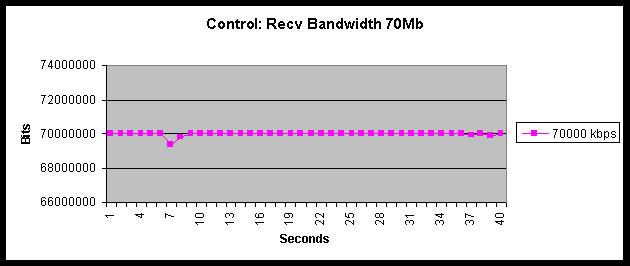
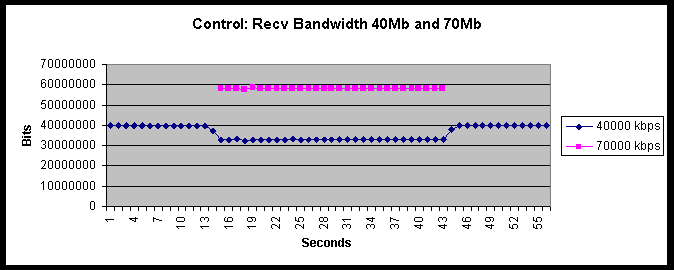
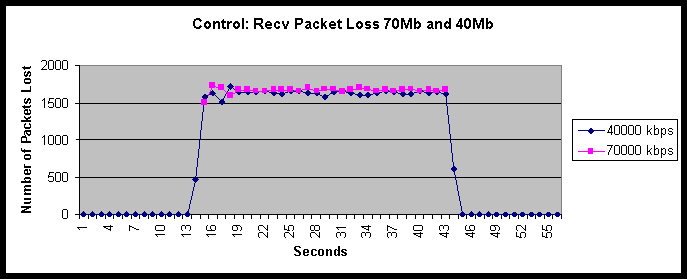
Use the same gen_sends as before. gen_rec bandwidth and packet loss data follows. Since the bandwidth sum of the two sends through the 100Mbit Fast Ethernet 0/1/0 interface is 110Mbits/sec, packets are dropped. Both sends are BE traffic, so packet loss is distributed between the two sends.
Police and drop
QUESTION: is there a price to pay for marking packets - i.e. does conform-action = transmit give different numbers than set-prec-transmit?
Router(config)#ip cef distributed
Router(config)#access-list 40 permit 192.168.31.28
Router(config)#interface fastethernet 0/0/0
Router(config-if)#rate-limit input access-group 40 40000000 24000 30000 conform-action set-prec-transmit 3 exceed-action drop
mvid% gen_send 192.168.37.134 4953 35000 430 100
msg len: 442
sends per second: 9899
mvid% gen_send 192.168.37.134 4955 40000 500 100
msg len: 506
sends per second:
mvid% gen_send 192.168.37.134 4956 45000 560 100
msg len: 570
sends per second:
Bandwidth reservation
.- Send a stream of known bandwidth from Fast Ethernet 0/0/0 to Fast Ethernet 0/1/0 and from Fast Ethernet 1/0/0 to Fast Ethernet 0/1/0 at the same time. The sum of the two bandwidths is greater than the 100Mb supported by Ether0/3. Configure a QOS flow to reserve bandwidth on one of the steams. Compare the results with the control.
- Configure Queuing on Fast Ethernet 0/1/0 so that when contention occurs, packets from mvid are not dropped, instead all packet dropping occurs on the BE flow from citvid.
From the configuration in the Police and Drop section, packets from mvid are being marked as precedence group 3. Packets coming from citivid have no associated rate-limit and therefore are marked with the default precedence of 0. WFQ was tried first, and didn't work. WRED was then tried, and did work.
WFQ configuration:
Router#(config) interface FastEthernet 0/1/0
Router#(config) fair-queue tos 3 weight 40
Router#show access-list
Standard IP access list 40
permit 192.168.31.28
Router#show interfaces FastEthernet 0/1/0 fair-queue
FastEthernet0/1/0 queue size 0
packets output 210136, wfq drops 1, nobuffer drops 0
WFQ: aggregate queue limit 3232, individual queue limit 1616
max available buffers 3232
Router#show interfaces FastEthernet 0/0/0 rate-limit
FastEthernet0/0/0
Input
matches: access-group 40
params: 40000000 bps, 24000 limit, 30000 extended limit
conformed 611834 packets, 303283357 bytes; action: set-prec-transmit 3
exceeded 34063 packets, 18936880 bytes; action: drop
last packet: 8ms ago, current burst: 0 bytes
last cleared 00:12:07 ago, conformed 3334000 bps, exceeded 208000 bps
Router#
QUESTION: why does this configuration show queue size = 0? Is there more that needs to be done to make this configuration functional?
WRED does work with the following configuration.
Router(config)#interface fastethernet 0/1/0
Router(config-if)#random-detect
Router(config-if)# random-detect precedence 0 32 256 100
Router(config-if)#random-detect precedence 1 64 256 100
Router(config-if)#random-detect precedence 2 96 256 100
Router(config-if)#random-detect precedence 3 3072 4096 100
Router(config-if)#random-detect precedence 4 160 256 100
Router(config-if)#random-detect precedence 5 192 256 100
Router(config-if)#random-detect precedence 6 224 256 100
Router(config-if)#random-detect precedence 7 256 256 100
Note that I set the minimum queue threshold on precedence queue 0 very low (32) and very high (3072) on precedence queue 3. This extreme setting is to ensure that the calculated average queue size on precedence queue 3 is always less than the minimum queue threshold.
QUESTION: What happens if the minimum queue threshold for precedence queue 0 is raised?
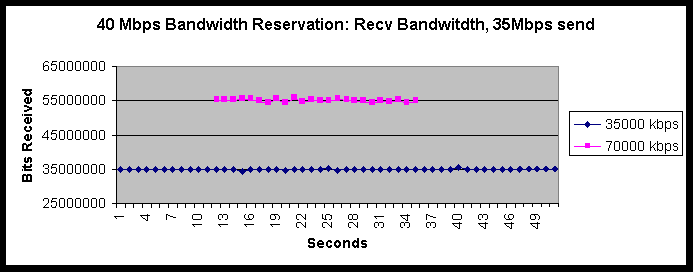
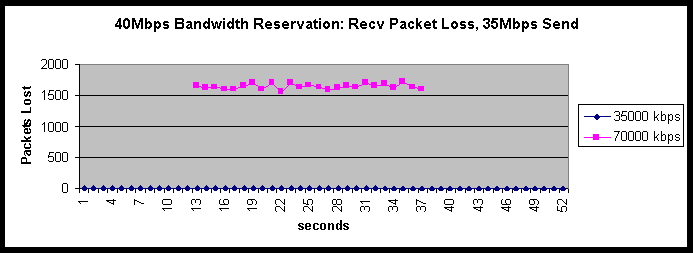
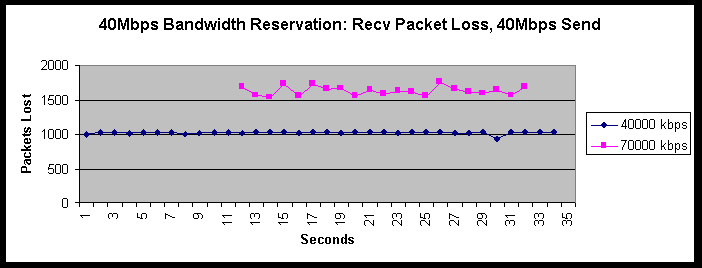
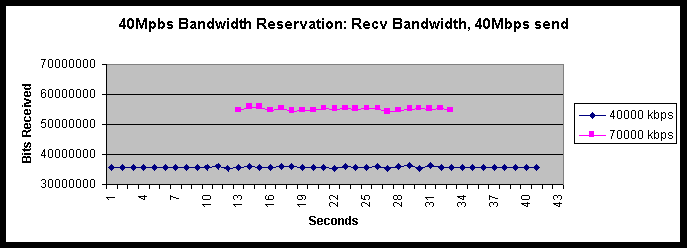
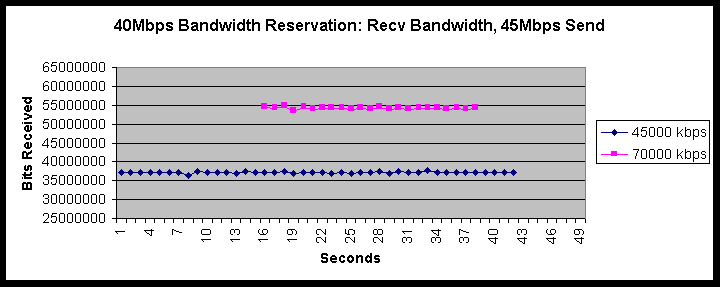
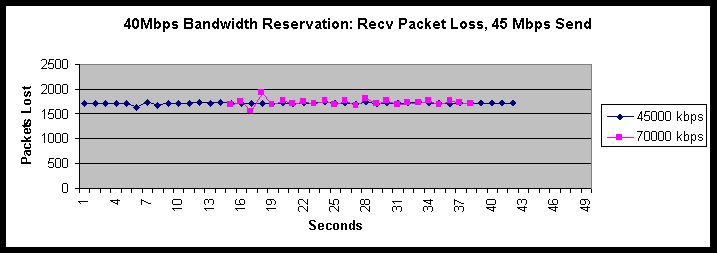
The same three test flows that were run in the Police and Drop section are run here, the difference being the presence of a 70000kbps BE flow to the same Fast Ethernet receiving interface. The desired result is to demonstrate a router configuration that allows reserved flows to exhibit packet loss and bandwidth characteristics in the presence of large BE flows equal to characteristics exhibited with no BE competition.
The CAR and WRED configuration has the desired characteristics. The command
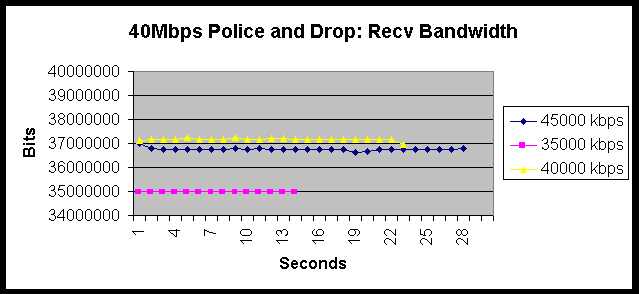
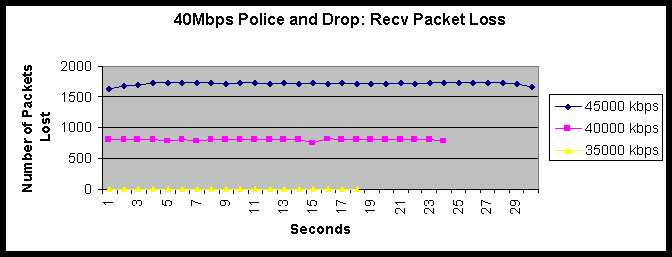
show interfaces fastethernet 0/1/0 random-detect shows the precedence 3 queue with no drops. Comparing the Police and Drop data with the Bandwidth Reservation data shows that packets from the 40000kbps and 45000kbps sends are dropped due to the CAR rate-limit configuration.- Send 35000kbps from mvid to nmctv and send 70000kbps from citivid to nmctv at the same time
gen_send 192.168.37.134 1307 35000 438 100
msg len: 442
sends per second: 9899
gen_send 192.168.37.134 1308 70000 1000 1150 100
msg len: 1154
sends per second: 7583
- Send 40000kbps from mvid to nmctv and send 70000kbps from citivid to nmctv at the same time.
gen_send 192.168.37.134 1290 40000 520 100
msg len: 524
sends per second: 9542
citivid% gen_send 192.168.37.134 1291 70000 1000 1150 100
msg len: 1154
sends per second:7583
- Send 45000kbps from mvid to nmctv and send 70000kbps from citivid to nmctv at the same time.
gen_send 192.168.37.134 1313 45000 560 100
msg len: 570
sends per second: 9869
gen_send 192.168.37.134 1314 70000 1000 1150 100
msg len: 1154
sends per second: 7583
Configurations
Control configuration
Current configuration:
!
version 12.0
service timestamps debug uptime
service timestamps log uptime
no service password-encryption
service udp-small-servers
service tcp-small-servers
!
hostname Router
!
boot system flash slot1:rsp-pv-mz.120-4.T.bin
enable password xxxx
!
ip subnet-zero
no ip cef
!
!
!
interface FastEthernet0/0/0
ip address 192.168.31.6 255.255.255.128
no ip directed-broadcast
ip route-cache distributed
!
interface FastEthernet0/1/0
ip address 192.168.37.6 255.255.255.0
no ip directed-broadcast
ip route-cache distributed
!
interface FastEthernet1/0/0
ip address 192.168.41.6 255.255.255.0
no ip directed-broadcast
ip route-cache distributed
!
interface Ethernet1/1/0
ip address 192.168.10.6 255.255.255.0
no ip directed-broadcast
ip route-cache distributed
!
interface Ethernet1/1/1
no ip address
no ip directed-broadcast
ip route-cache distributed
shutdown
!
interface Ethernet1/1/2
no ip address
no ip directed-broadcast
ip route-cache distributed
shutdown
!
interface Ethernet1/1/3
no ip address
no ip directed-broadcast
ip route-cache distributed
shutdown
!
no ip classless
ip route 0.0.0.0 0.0.0.0 192.168.10.1
no ip http server
!
!
!
line con 0
password xxxx
transport input none
line aux 0
line vty 0 4
password xxxx
login
!
end
CAR and WRED configuration
Current configuration:
!
version 12.0
service timestamps debug uptime
service timestamps log uptime
no service password-encryption
service udp-small-servers
service tcp-small-servers
!
hostname Router
!
boot system flash slot1:rsp-pv-mz.120-4.T.bin
enable password xxxx
!
ip subnet-zero
ip cef distributed
!
interface FastEthernet0/0/0
ip address 192.168.31.6 255.255.255.128
no ip directed-broadcast
rate-limit input access-group 40 40000000 24000 30000 conform-action set-prec-transmit 3 exceed-action drop
ip route-cache distributed
!
interface FastEthernet0/1/0
ip address 192.168.37.6 255.255.255.0
no ip directed-broadcast
ip route-cache distributed
random-detect
random-detect precedence 0 32 256 100
random-detect precedence 1 64 256 100
random-detect precedence 2 96 256 100
random-detect precedence 3 3072 4096 100
random-detect precedence 4 160 256 100
random-detect precedence 5 192 256 100
random-detect precedence 6 224 256 100
random-detect precedence 7 256 256 100
!
interface FastEthernet1/0/0
ip address 192.168.41.6 255.255.255.0
no ip directed-broadcast
ip route-cache distributed
!
interface Ethernet1/1/0
ip address 192.168.10.6 255.255.255.0
no ip directed-broadcast
ip route-cache distributed
!
interface Ethernet1/1/1
no ip address
no ip directed-broadcast
ip route-cache distributed
shutdown
!
interface Ethernet1/1/2
no ip address
no ip directed-broadcast
ip route-cache distributed
shutdown
!
interface Ethernet1/1/3
no ip address
no ip directed-broadcast
ip route-cache distributed
shutdown
!
no ip classless
ip route 0.0.0.0 0.0.0.0 192.168.10.1
no ip http server
!
access-list 40 permit 192.168.31.28
!
!
line con 0
password xxxx
transport input none
line aux 0
line vty 0 4
password xxxx
login
!
end
Router#show interfaces random-detect
FastEthernet0/1/0 queue size 0
packets output 479, wred drops 0, nobuffer drops 0
WRED: queue average 0, weight 1/512, max available buffers 3232
Precedence 0: 32 min threshold, 256 max threshold, 1/100 mark weight
7 packets output, drops: 0 random, 0 threshold
Precedence 1: 64 min threshold, 256 max threshold, 1/100 mark weight
(no traffic)
Precedence 2: 96 min threshold, 256 max threshold, 1/100 mark weight
(no traffic)
Precedence 3: 3072 min threshold, 4096 max threshold, 1/100 mark weight
(no traffic)
Precedence 4: 160 min threshold, 256 max threshold, 1/100 mark weight
(no traffic)
Precedence 5: 192 min threshold, 256 max threshold, 1/100 mark weight
(no traffic)
Precedence 6: 224 min threshold, 256 max threshold, 1/100 mark weight
444 packets output, drops: 0 random, 0 threshold
Precedence 7: 256 min threshold, 256 max threshold, 1/100 mark weight
(no traffic)
Router#show access-list
Standard IP access list 40
permit 192.168.31.28
Router#show interfaces rate-limit
FastEthernet0/0/0
Input
matches: access-group 40
params: 40000000 bps, 24000 limit, 30000 extended limit
conformed 0 packets, 0 bytes; action: set-prec-transmit 3
exceeded 0 packets, 0 bytes; action: drop
last packet: 5320308ms ago, current burst: 0 bytes
last cleared 00:06:27 ago, conformed 0 bps, exceeded 0 bps




